Five things at once.
None of them lost.
adhdTerminal holds every Claude Code session you started on one wall, named in plain language, telling you which one is working and which one is waiting for you.
macOS 13+ · 13 MB · universal · notarised by Apple
The wall
One window. Every session.
Real terminals.
Each tile is a real pty running real Claude Code. Click one and it lifts above the others, centred and three times larger. The rest never pause.
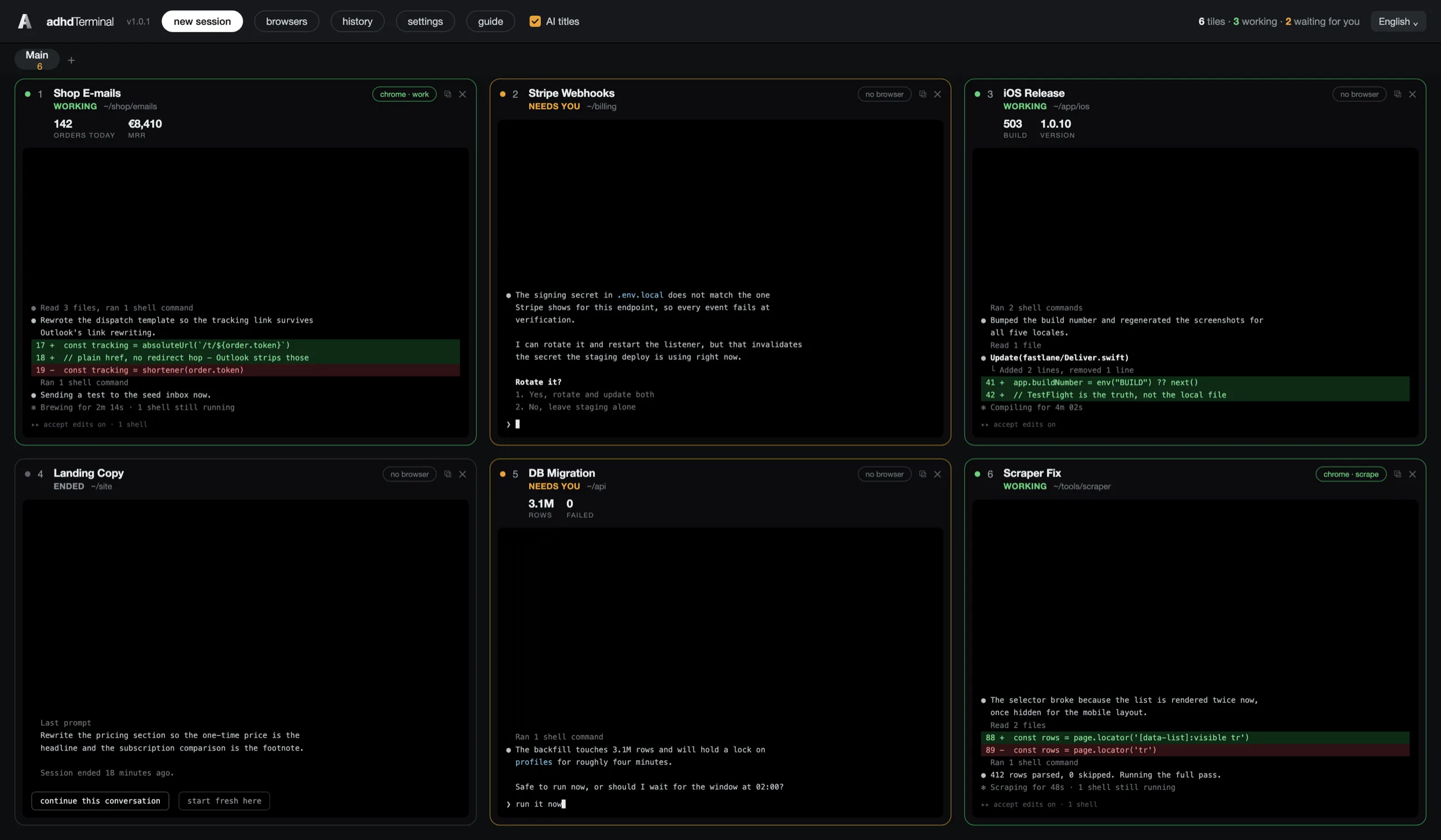
Six sessions · three working · two waiting for you · one ended
Live numbers under two of the headers
The real cost
The problem was never
that you start too much.
You can hold five threads at once. What you cannot hold are the five that are off screen. Every other answer to this asks you to run fewer things. This one makes losing them impossible.
Out of sight, gone
A background tab carries no status. Either you remember to go and look at it, or it quietly stops existing.
The restart tax
Returning to a dropped thread never starts with the work. It starts with re-reading what you had asked for and how far it got.
A list is not a picture
Cmd+Tab gives you window names. You cannot glance at names and know which one stopped and is waiting for an answer.
In the app today
Nine things that do not
need you to remember.
Everything here is shipped and in the app today. What is still being built is further down, and labelled.
Tiles name themselves
After the first prompt a summariser turns the folder name into a live two-to-four-word label. Rename one by hand and the AI never touches it again.
Status, from across the room
Claude Code posts session events to a local server inside the app, so every tile knows whether it is working, waiting for you, or ended.
Cmd+J goes to whatever needs you
One key walks you through every tile waiting for an answer. You never have to remember which ones they were.
A crash does not cost you the day
Open tiles and Claude's own session ids are saved on every change. The next launch brings the wall back and resumes each conversation.
Live numbers on a tile
Tell a tile to show today's orders. Claude writes a read-only command, tests it, registers it, and the app runs it from then on. Five per tile.
Sharp text at any size
Every pty is fixed at 120 by 38 and the font is computed from the tile, so no resize signal is ever sent and Claude Code never redraws.
Five browsers, five tiles
Bind a tile to one specific Chrome, and two tiles drive two different browsers at once, under names you gave them yourself.
Finished sessions stay put
An ended session keeps its last prompt and two buttons: continue that conversation, or start fresh in the same folder.
Drop a file into a terminal
A pasted image or dropped PDF is written to disk and its path typed into the prompt, because a pty cannot carry bytes.
Keyboard
Nothing collides
Ctrl belongs to the terminal, Cmd belongs to the window. Claude Code uses no Cmd combination, so the wall never steals a key from the thing running inside it.

Attention
Parallel when you want it.
One thing when you need it.
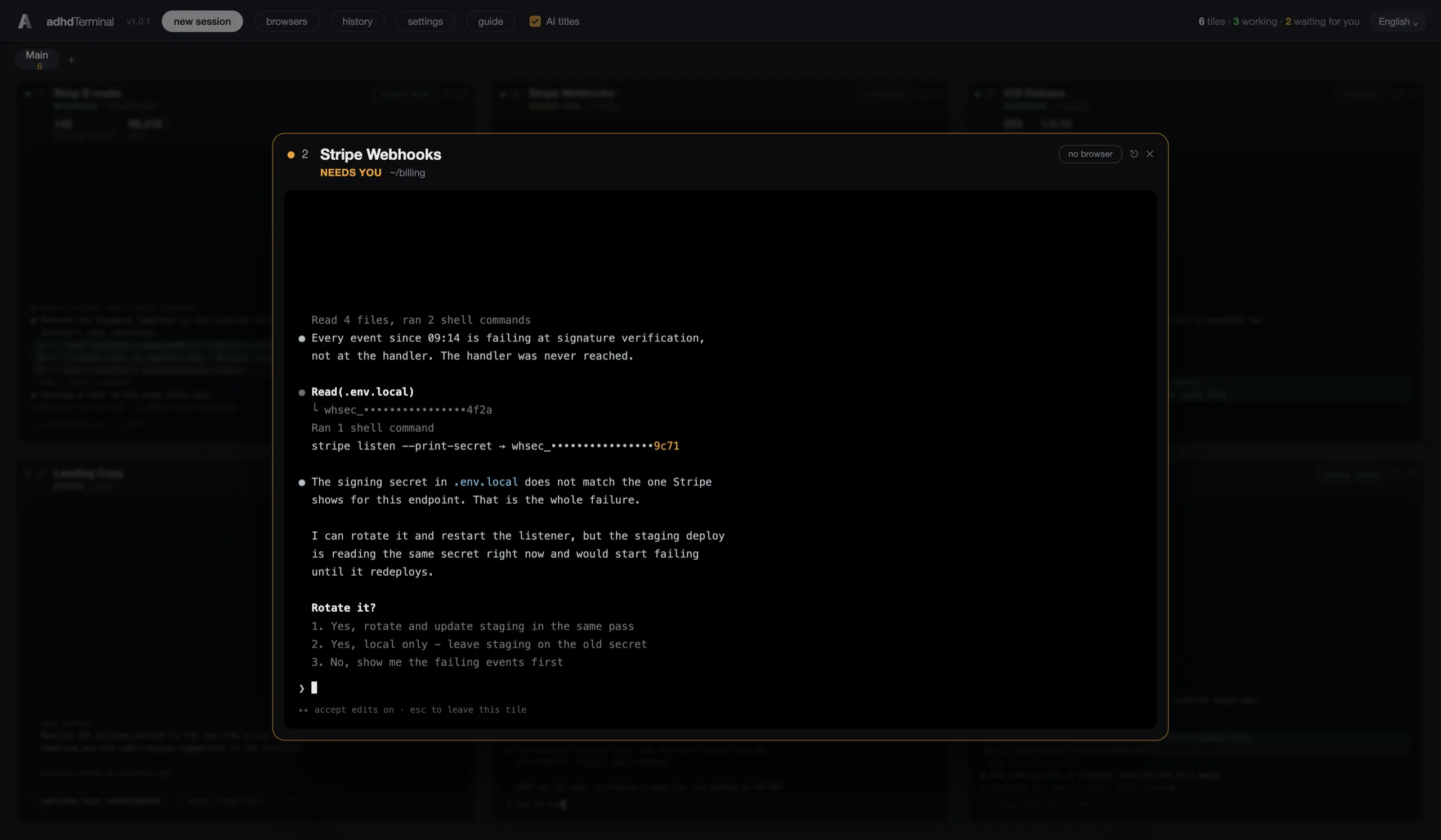
Zoom a tile and the wall goes quiet behind it. Nothing is paused because you looked away, and when you come back out the others are still there, still labelled, still telling you where they got to.
Included in the price
What is coming, free
One payment. Every version after it is included. No renewal, no second invoice, no tier that unlocks the good part later.
A focus mode that dims every tile but one, on a timer you set
Per-tile build and deploy status, so a red tile means a red build
A separate Claude account per tile
A nudge when a tile has been waiting for you too long
Roadmap, not shipped. Everything above it is in the app today.
Price
Once. Updates free forever.
The whole app. No tiers, no seats, no add-ons
Every future version, free, forever
Install on every Mac you own
No account, no server, no analytics
Thirty days money back, no questions
Needs Claude Code and a Claude Pro or Max plan, or API billing. Those are Anthropic’s products, billed by Anthropic. adhdTerminal is not affiliated with Anthropic.
FAQ
Straight answers
Do I need a Claude subscription as well?
Yes. adhdTerminal is the wall; Claude Code is what runs inside it. You need Claude Code installed and a Claude Pro or Max plan, or API billing. The app installs Claude Code and signs you in on first launch, in the background, without you typing anything.
Is $99 really the only payment?
Yes. One payment, every future version included. No renewal, no higher tier, no feature held back for a plan that does not exist yet.
Does my code leave my Mac?
The app has no server, no account and no analytics. What leaves your Mac goes through Claude Code under your own Anthropic account. If AI tile titles are on, short excerpts of tile output are sent for naming, and one switch in the top bar turns that off entirely.
Do I have to have ADHD to buy this?
No. The name describes how the tool works, not who is allowed to use it. If you have ever lost a terminal tab for three days, it was built for you.
Windows or Linux?
Mac only. macOS 13 or newer, universal binary for Apple Silicon and Intel, 13 MB on disk and a 5 MB download.
How do updates arrive?
The app checks once a day and offers the new version in place. No store, no reinstall, no re-download of your settings.
What if it does not help?
Thirty days, full refund, no questions asked.